Preference
Windows users open the preferences dialog via the main menu "Edit-> Preferences"; Mac users open the Preferences dialog box via the main menu "FairyGUI Editor-> Preferences".
Common
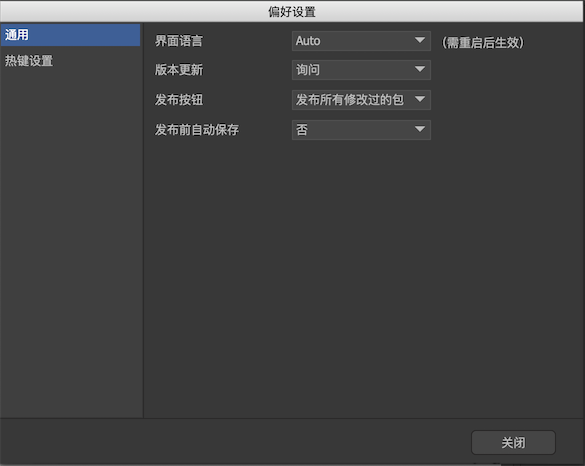
-
Interface languageSet the editor interface language. -
new version updateSet whether to update the software automatically. -
Post buttonSets the function of the Publish button on the main toolbar.Publish the current packagePublish the current active package (if the editor focuses on the resource library, the active package refers to the package where the resource currently selected is in the resource library; if the editor focuses on the document view, the active package refers to the package where the component currently being edited is located ).Publish all modified packagesPublish the current active package, as well as all packages that have been modified but never released.Publish all packagesPublish all packages.
-
Auto-save before publishingSet whether to automatically save all modified but unsaved documents before publishing.
Hotkey settings
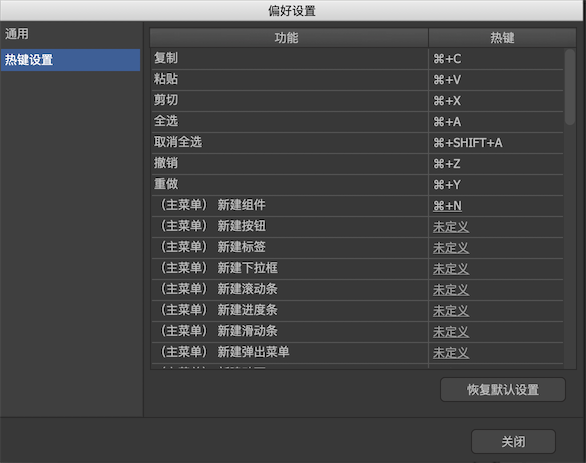
Here you can assign new hotkeys for frequently used functions. The hotkeys of "Copy / Paste / Cut / Select All / Unselect All / Undo / Redo" cannot be modified. Other functions can be modified by clicking the hotkey link.
The editor does not distinguish between the Ctrl and Command keys, they are equivalent.