Plugin
The editor supports plug-ins. Plug-ins provide complete control over the editor, including but not limited to the following functions:
- Display a customized view.
- Display the customized Inspector.
- Customize the menu.
- Operations on resources, such as import and export.
- Add components to the stage and set the properties of the components on the stage.
- Insert custom actions into the publishing process. For example, custom publishing code.
Supports plug-in development in three languages: Lua, Typescript, and Javascript. The plug-in hosting environment is XLua and Purets. Plug-in examples can be downloaded from warehouse.
Plug-in view
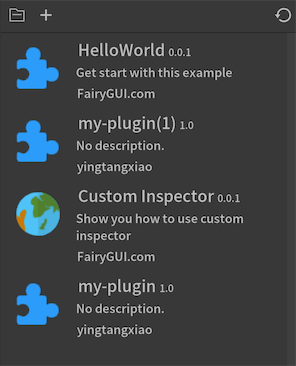
-
 Open the directory where the plug-in is placed. The plug-in directory is under the "project root directory/plugins" directory, and each plug-in corresponds to a subdirectory.
 -
 Create a new plug-in. A dialog box pops up after clicking: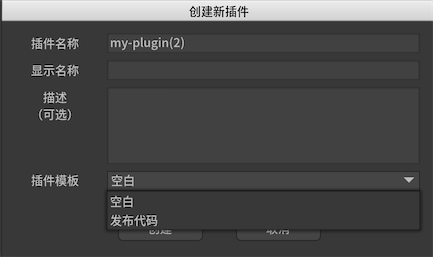
plugin_nameThe name of the plugin will be used as the name of the plugin directory.Display NameThe value set here will be displayed in the title of the plugin list.DescriptionThe value set here will be displayed in the description of the plugin list.Plug-in TemplateYou can use a template when creating, such as using the release code template. The template contains the entire process of customizing the release code, and can be adapted to the special needs of the project with slight modifications.
Use Lua to develop plug-ins
The editor's open API can be found in LuaAPI. It is recommended to use EmmyLua to write plug-ins.
You can use the fprint method to output information to the console for debugging.
If you need to require other Lua files in main.lua, you should use the predefined variable PluginPath, for example:
require(PluginPath..'/xxx')
But PluginPath cannot be used in other lua files.
References:
Use Typescript/Javascript to develop plug-ins
The editor's open API can be found in TsAPI. It is recommended to use VSCode to write plug-ins. The editor runs JS, so TS needs to be translated into JS.
If you want to introduce other modules in main.ts/main.js, just follow the module management rules of nodejs.
You can use console.log to output information to the console for debugging.
Here are some examples:
//Introduce C# class
const FairyEditor = CS.FairyEditor;

//Publish start notification
export function onPublishStart(pkgs: CS.System.Array$1<CS.FairyEditor.FPackage>) {
     console.log(pkgs.get_Item(0).name);
}

//Publish end notification
export function onPublishEnd(pkgs: CS.System.Array$1<CS.FairyEditor.FPackage>) {
     console.log(pkgs.get_Item(0).name);
}

//Initiate an http request
async function httpGetSample() {
     let client = new CS.System.Net.Http.HttpClient()
     var responseString = await puerts.$promise(client.GetStringAsync("http:/example.com/"));
     console.log(responseString);
}
References: